
Overview
The Attribution page is where you configure how Branch attributes user sessions, tracks organic traffic, and measures conversion events.
Use this page to manage:
You can access this page by navigating to Configuration > Attribution in Branch. To open this page, you need Edit access to App-level Settings. When SKAN is turned on for your account, the page also has a SKAN tab, and the settings in this article are on the Attribution Windows tab.
Attention
Branch's new experience is rolling out in phases, so your interface may differ. This article covers the Attribution page in the new experience. To learn more, see New Branch Overview.
Configure settings
The Attribution page includes the following configuration options:
PAM
Predictive Aggregate Measurement (PAM) is Branch's attribution modeling solution designed to expand mobile attribution coverage. While solutions like SKAdNetwork (SKAN) provide some measurement, they're highly limited. PAM unlocks additional insights for users who would otherwise only show up in aggregated reports or appear as Unattributed entirely. You can use PAM alongside SKAN and AdAttributionKit.
When PAM is available for your account, the Attribution page has a PAM section. Toggle the PAM switch in that section to start using PAM.
For detailed information about PAM, visit the PAM Overview and PAM Data Reference articles.
SEO and AIO
Search engine optimization (SEO) App Attribution tracks and attributes organic traffic from search engines. When users arrive from Google, Bing, Yahoo, or other search engines, Branch identifies the source and attributes the session with ~feature set to organic search and ~channel set to the search engine's name.
AI optimization (AIO) App Attribution tracks and attributes organic traffic from AI chat agents. When users arrive from ChatGPT, Claude, Gemini, Copilot, or Perplexity, Branch identifies the source and attributes the session with ~feature set to organic chat agent and ~channel set to the chat agent's name.
These settings are in the SEO section, which appears only when SEO App Attribution is turned on for your account. In the Type to add Search Engine Result Page (SERP) Domains field, list each web domain you want to enable SEO and AIO App Attribution for. Enter each host name exactly, without https:// in front of it. For example, www.branch.io is a valid entry. Wildcard characters aren't supported. An entry like branch.io doesn't cover its subdomains, so add each host name your pages use.
Before you can use SEO and AIO App Attribution, your development team must implement the Branch SDK and configure Universal Links and App Links. See the SEO and AIO implementation documentation for technical setup details.
For more information about SEO and AIO App Attribution, including analytics and troubleshooting, visit the general SEO and AIO App Attribution documentation.
Attribution windows
Attribution windows define the time periods during which Branch can attribute conversion events back to a specific touch point (click or impression). These windows control the maximum time allowed between a user's interaction with your marketing and the resulting downstream event.
The Attribution Windows section of the Attribution page displays a table with the following attribution types:
| Attribution type | Description |
|---|---|
click to start session | Time between a click and an open or web session start (default: 1 day) |
click to install | Time between a click and an install or reinstall (default: 7 days) |
click to conversion event | Time between a click and a conversion event. Conversion events include Commerce Events such as purchase and add_to_cart, all Custom Events, and all view-based Branch Events like pageview (default: 30 days) |
impression to start session | Time between an ad impression and an open or web_session_start (default: 1 day) |
impression to install | Time between an ad impression and an install or reinstall (default: 1 day) |
impression to conversion event | Time between an ad impression and a conversion event (default: 7 days) |
deep linking duration | Maximum time between a click and a user being deep linked (default: 120 minutes) |
re-engagement inactivity | Defines the period between two events that a user must be inactive to define the later event as a re-engagement (default: 7 days) |
household measurement window | Time between a household device's ad engagement and an install, open, or web_session_start (default: 2 days) |
The household measurement window row appears only when household measurement is turned on for your account.
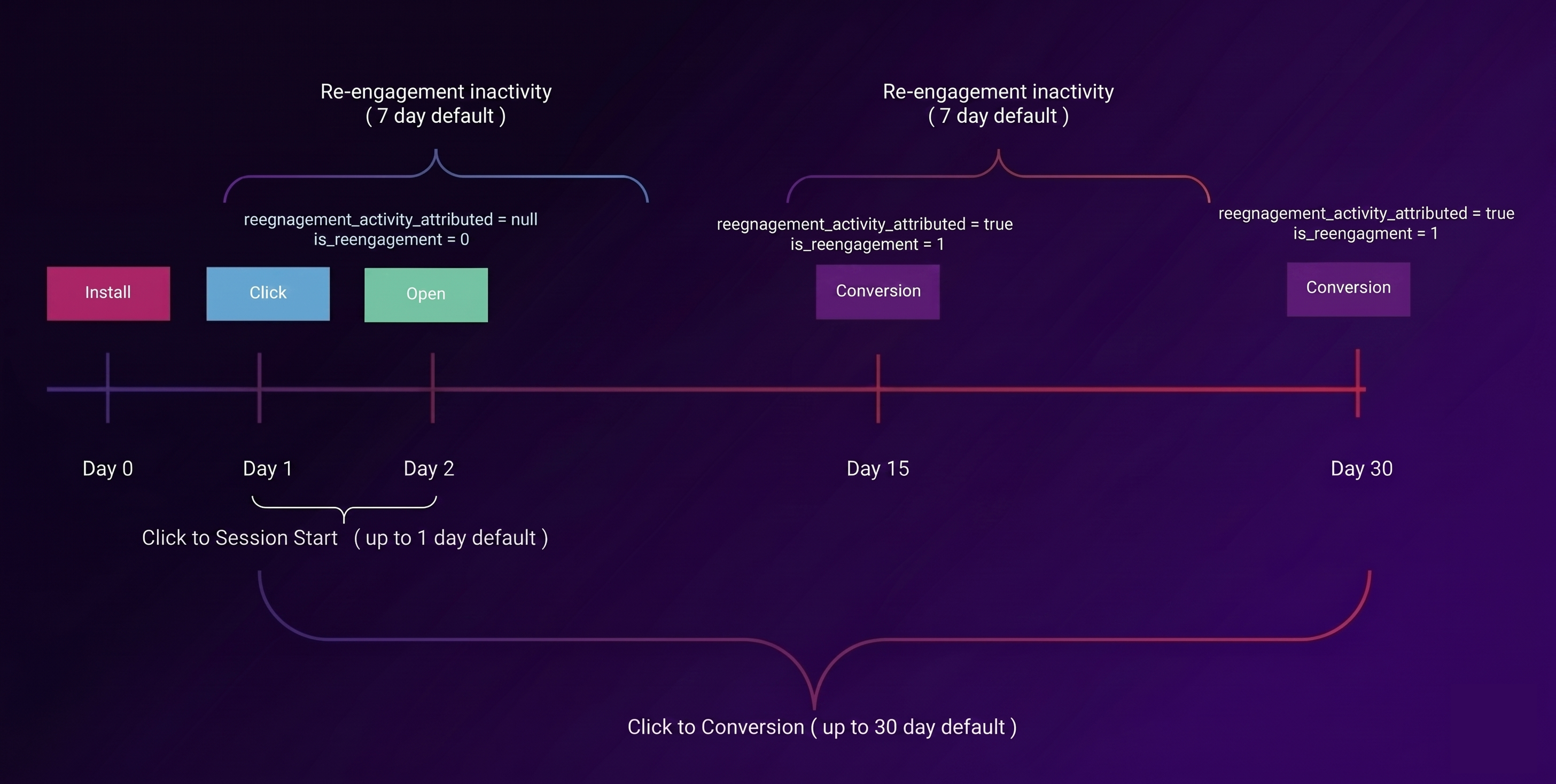
Adjust attribution windows
To adjust your attribution windows, select the window value you want to change in the table and enter your desired value. Each attribution type has its own range:
- Click windows can be from 0 to 90 days.
- Impression windows can be from 0 to 7 days.
- The deep linking duration can be from 0 to 1,440 minutes (24 hours).
- The re-engagement inactivity window can be from 0 to 90 days.
- The household measurement window can be 1, 2, or 3 days.
Note
Changes to attribution windows settings apply to future attributions only. Allow several minutes for changes to persist through Branch's system.
For more detailed information about attribution windows, including organization and app-level inheritance, visit the Attribution Windows documentation.
Important notes
Reference the following notes when adjusting your attribution windows:
deep linking durationincludes anyone clicking a Branch Link or being automatically redirected to the app through a Branch Web SDK call. This setting also sets the maximum time allowed for probabilistic modeling, so changing it changes how long Branch can use probabilistic modeling for attribution.click to ...attribution types refer to events that occur after someone clicks a Branch Link.- For example, someone clicks a Branch Link, installs your app, and comes back 10 days later to make a purchase. If your
click to conversion eventwindow is longer than 10 days, Branch counts that purchase as an attributed conversion.
- For example, someone clicks a Branch Link, installs your app, and comes back 10 days later to make a purchase. If your
impression to ...attribution types refer to events that occur after someone views a Branch Impression Tracking Link.Re-engagement cohort analysis uses
re-engagement inactivity, but activity analysis doesn't.
Save changes
After making any changes to your attribution settings, select the Save Changes button at the top of the page to apply your updates.
Caution
Changes to attribution settings can significantly impact how Branch attributes user sessions and conversion events. Review your changes before you save them.